Daily Health Checks Are Boring. That Is Why They Work.
May 4, 2026
The thing that pushed this topic to the forefront for me was not a dramatic outage.
It was the normal mess that shows up once my automation environment became useful: scheduled jobs, publishing syncs, memory capture, browser automations, backup paths, mailboxes, API tokens, and multiple AI workers all depending on each other.
Nothing about that is exotic. That is the point.
When a system starts doing real work, the risk changes. The risk is no longer only, “Did the app go down?” The risk becomes, “Did something quietly stop doing the thing I assume it was doing?”
That’s why I am a believer in the daily health check.
Not a giant enterprise dashboard. Not a 40-page report nobody reads. A short, opinionated, operational check that answers one question every day:
Is the machine still trustworthy?
The problem is silent drift
Most small automation environments don’t fail dramatically.
They drift.
A scheduled cron job keeps running, but the output is empty. A backup script exits successfully, but it skipped the directory that mattered. A token is still present, but the service account no longer has the permission it needs. A mailbox bridge is alive, but its cursor moved past the work it was supposed to process. A memory capture job writes a file, but the file contains no useful turns. The weekly security check runs, so it gets a green check because it completed, even though it had 127 findings.
From the outside, everything looks fine.
That is the dangerous part.
If you are running AI-assisted workflows, this gets even more important. AI systems often sit on top of normal infrastructure: files, APIs, queues, calendars, email, browsers, databases, scheduled jobs, and authentication. If the foundation drifts, the agent on top of it may still sound confident while producing stale, incomplete, or misleading work.
Confidence is not health. Evidence is health.
What drove this in my environment
The trigger for me was the usual accumulation of “small” things.
A daily memory process needed to stop treating missing capture as a successful no-op. The system report needed to stop spamming during manual fixes but still deliver on schedule the next morning. A publishing workflow needed the right Cloudflare credential path. Agent bridges needed to stop chewing through stale backlog and start responding to current work. Token files had started to sprawl, which made it harder to tell which credentials were active, duplicated, stale, or just leftover debris.
Individually, none of those activities sounds too dramatic. Together though, they are exactly how operational trust gets lost. The lesson was simple: if I need to ask, “Is this actually working?” more than once, that question belongs in a health check.
The domains worth checking
A useful daily health check should not just ask whether the website is up.
It should look across the domains that make the work possible:
Memory continuity: Did yesterday’s work get captured? Is the file non-empty? Was anything durable promoted from short-term to long-term memory?
Services: Are the core apps responding? Are any units in a failed state, wedged, or restarting in a loop?
Scheduled jobs: Did the expected cron jobs run? Did any fail? Did any quietly stop producing output?
Architecture: Does the live system still match the intended operating model?
Infrastructure: Are disk, memory, load, and uptime within safe and expected bounds?
Storage: Are the databases readable? Are object stores reachable? Are queues growing unexpectedly?
Backups: Are backups recent, complete, and pointed at the right destinations?
Restoration: Can the backup artifacts actually be opened or restored? Did the daily sample, weekly incremental and monthly complete restoration tests actually work?
Communications: Are email, chat, telegram, discord, and other notification paths working?
Credentials: Are active tokens present, scoped correctly, and not duplicated across random files?
The important part is not the exact list (and yours will most certainly be different than mine). The important part is that the list matches how the work really flows. If a workflow depends on it, it deserves a check.
A sanitized example
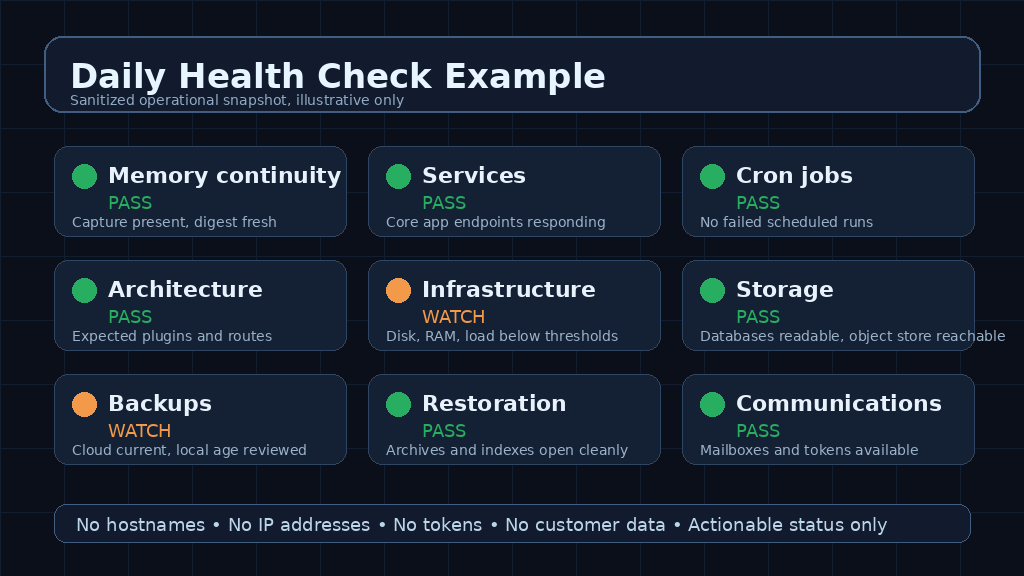
Here is the kind of picture I want from a daily report. Not secrets. Not internal hostnames. Not IP addresses. Just the state of the machine at the level where I can make a decision.
A good report should tell me what passed, what needs attention, and what was already remediated. It should not leak the keys to my house while trying to prove the house is locked.
That means sanitizing aggressively:
• No public or private IP addresses.
• No hostnames that reveal internal layout.
• No tokens, API keys, session IDs, or account IDs.
• No full file paths if they reveal my usernames or infrastructure names
• No detailed error payloads that expose credentials or architecture.
Security reporting should reduce risk, not create a new one.
What to watch out for
There are a few traps I would avoid.
First, don’t confuse “green” with “healthy.” A script can return green because it did not check the right thing. For example, a backup job is not healthy because it ran. It is healthy because the resulting backup is recent, complete, readable, and restorable.
Second, don’t let noisy checks bury the important checks. If a report produces the same warning every day and nobody acts, people stop reading it. Either fix the condition, suppress it with a clear reason, or make the threshold smarter.
Third, don’t have your agents send every intermediate test to the same inbox as the daily report. During remediation, they may run a check ten times. That does not mean you need or want ten emails. Manual runs should be suppressible and scheduled production reports should remain predictable.
Fourth, don’t let tokens multiply. Token sprawl is not just untidy. It makes rotation harder, incident response slower, and scripts less predictable. One active credential path per purpose is much easier to reason about than a pile of old JSON files and backups.
Fifth, don’t let your AI agents judge their own health by vibes. If an agent says it is done, ask where the artifact is. If a bridge says it is running, ask whether it processed current work. If a memory job says no-op, ask whether there was actually nothing to capture.
Better yet, ask another agent from a different model to check the first agent’s work. Trust, but verify. Then automate the verification.
How to build one without overbuilding it
Start small.
Pick the ten things that would make tomorrow worse if they silently failed today. Write deterministic checks for those first. Do not start with an AI agent if a shell command, database query, HTTP probe, or file-size check will do.
Then add judgment only where it’s needed.
A practical sequence looks something like this:
Define the domains that matter.
For each domain, define the smallest proof of health needed to truly verify the results.
Set thresholds for pass, watch, and fail (and they have to be related to the thing being measured, not the success of the scan or other test itself).
Capture evidence, not just status words. Send it to a logfile for posterity and to a discord or mailbox so it’s convenient and you actually take action on it without having to hunt it down.
Sanitize the report before it leaves the machine.
Send one scheduled report at a predictable time. Get into a tempo.
Suppress email for manual test runs. Frankly for some tests I tell my agents if there is a failure to just fix it then send me the completed report showing all passes. I definitely don’t want to see a report for each failure they fixed along the way.
Treat missing data as a failure, not as a success.
Include remediation notes when the system fixed something automatically. While my agents may fix things proactively, I want to know what was done.
Review the checks being performed weekly and remove noise.
The best health checks are boring because they are specific.
They do not say, “Everything looks good.” They say, “Memory capture exists and is non-empty. Core services are responding. No scheduled-job failures in the last 24 hours. Backups are recent. Restoration artifacts are readable. Credentials are present in the expected location.”
That is a different level of confidence, and it feels good.
The real point
The goal of a daily health check is not to create another report. The goal is to protect your trust in the system. Once automation starts handling real work, the operator needs a fast way to know whether the system is still safe to rely on. If the report is too vague, it doesn’t help. If it’s too noisy, it gets ignored. If it exposes secrets, it becomes its own security problem.
The sweet spot is short, evidence-based, sanitized, and actionable output that is easy to digest and act upon. A daily health check will not make an automation environment perfect. But it will catch the slow failures before they become embarrassing failures.
And in a world where more of our work is being handed to scripts, agents, and scheduled workflows, that boring little ritual matters more than it looks.